
How to open
-
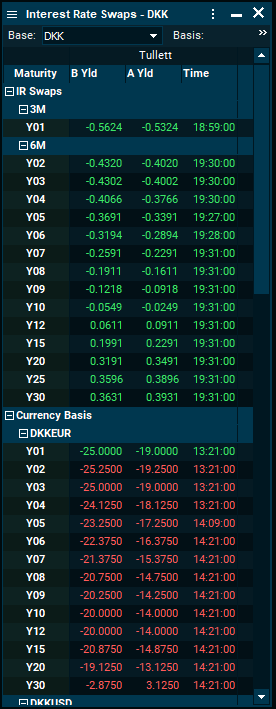
Search for "Interest Rate Swaps" by using the search field > select a given base currency from the list.
-
Main menu > "Explore" > "Money Market" > "IR Swaps".
|
Function |
Description |
|---|---|
|
Base |
Currency selection. When more than one currency is selected, then the currencies will appear below the toolbar as tabs. The |
|
Basis |
Select the type of swap: Interest Rate Swap, Currency Basis Swap, Tenor Basis Swap. |
|
Contributor |
Select the sources of the information to be displayed. It can be global and regional banks, or inter-dealer broker data. |
|
Columns |
Allows the tailoring of the data to be displayed, such as mid yield and symbol name. |
|
Consolidation |
When selected, it displays a single set of quotes that correspond to the last updates. |
|
Excel RTD Linking |
Select the series or instrument to export to Excel and press <CTRL>+<R>. |
|
Swap Curves |
Double-click any series to chart them.To compare them, click any instrument while holding <CTRL> to drag and drop into an existing chart. Other instruments are supported. |
Useful keyboard shortcuts
|
Keyboard shortcut |
Description |
|---|---|
|
<F11> |
Hides toolbar. |
|
<CTRL>+<C> |
Consolidates the contributed data on a time of update basis. |
|
<CTRL>+<RIGHT> |
Expands all collapsed groups. |
|
<CTRL>+<LEFT> |
Collapses all groups. |